
Scaricare NeoOffice
Il progetto NeoOffice non è più attivo
In sostituzione, potresti provare LibreOffice
| Versione NeoOffice | Prezzo | Versioni macOS e OS X | Note |
|---|---|---|---|
| Versioni correnti | |||
| Scarica da uno dei seguenti siti: | Gratis |
|
Utenti del Mac App Store: alcune funzionalità non sono disponibili nella versione Mac App Store per soddisfare i requisiti di sicurezza del Mac App Store di Apple |
| Versioni precedenti | |||
| NeoOffice 2017.33 Professional Edition | Gratis |
|
|
| NeoOffice 2015.12 Classic Edition | Gratis |
|
|
| NeoOffice 3.4.1 + Patch 28 | Gratis |
|
|
Problemi dopo l'aggiornamento a NeoOffice 2022? Prova questi passaggi
Installare NeoOffice
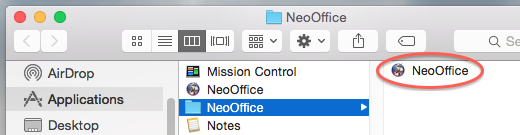 Per installare NeoOffice, fare doppio clic sul file scaricato nella cartella Download. Questo dovrebbe aprire una finestra del Finder che contiene il programma di installazione di NeoOffice. Fare doppio clic sul programma di installazione per iniziare l'installazione.
Il programma di installazione installa NeoOffice in una delle seguenti cartelle:
- Nella cartella Applicazioni
- Nella cartella Applicazioni / NeoOffice come mostrato nell'istantanea schermo
Disinstallare NeoOffice
Per disinstallare, basta trascinare l'applicazione NeoOffice dal Finder nel Cestino e svuotare il Cestino.