![]() |
|
||||
| Hjem | Nedlasting | Brukerstøtte | Funksjoner |
| OSS (FAQ) | NeoWiki | Trinity brukerforum | Bugzilla | Instruksjoner for kompilering |
| Støtt arbeidet | Early Access Program |
| NeoOffice 2.2.4 now available | ||
|
||
| NeoOffice 2.2.3 users: Upgrade to NeoOffice 2.2.4 by downloading the latest NeoOffice patch | ||
| Try the new Media Browser, native floating tool windows, and trackpad magnify and swipe features |
Although NeoOffice is free, we ask that you donate a small amount before you download NeoOffice.
Kostnadene og timetallet som brukes på NeoOffice er småpenger for store firmaer, men det er mye for de to som står bak NeoOffice. Pengegaver til prosjektet brukes til å betale løpende utgifter som nettilgang, datamaskiner og webhotell, som vi ellers måtte ha betalt selv.
Please consider donating a couple of dollars or Euros to help us continue to provide NeoOffice to everyone for free. If each user donated only one dollar or Euro, we could cover all of our costs for a year. If you are unable to donate, please consider volunteering a little of your time to help the NeoOffice project.
Du kan gi penger på nettet ved å bruke kredittkort eller en PayPal-konto. Selv om vi bruker PayPal til å håndtere kredittkort-transaksjoner, ber vi deg legge merke til at det ikke er nødvendig med en PayPal-konto for å bruke kredittkor. Klikk på knappen for å gi pengestøtte:
Important: Be sure to press the Return to NeoOffice.org button to return to our site after you complete your donation.
If you have made a donation recently, there is no requirement to donate again. Just click the Skip pengestøtte button to go to the list of the available downloads.
Minimumskrav til maskinvare for NeoOffice 2.2.4For å installere og bruke NeoOffice må du minimum ha følgende maskinvare:
Since NeoOffice is developed by volunteers and tested by users, we expect that users will find crashing or other serious bugs. We strongly recommend that you save your work frequently so that if you encounter a crashing bug, you will not lose much data. If you feel that you need software that has been heavily tested, we recommend that you use a commercially-supported product like Microsoft Office or Apple iWork.
Only install the versions of NeoOffice that are listed on this web site. Please do not install an unlisted version even if you downloaded it from this web site in the past. Using such unlisted versions is very risky as unlisted versions have bugs that we have fixed in the listed versions.
Lastly, when users report crashing or other serious bugs, we fix these bugs as fast as possible and release small patches that contain these bug fixes. We recommend that you get the latest bug fixes by downloading and installing the latest NeoOffice patch installer.
Installere NeoOffice 2.2.4Make sure that you read the important warnings for all users and check out the list of features and bugs before you install NeoOffice.
For å installere, dobbelklikk på den nedlastede filen i Finder. Det skal starte programmet Disk Copy. Disk Copy skal automatisk starte og åpne den nedlastede filen som et diskvolum som heter NeoOffice på skrivebordet ditt. Dobbelklikk på NeoOffice-volumet. Dette skal åpne et vindu i Finder som inneholder installeringsfilen NeoOffice.pkg. Når du dobbeltklikker på denne skal NeoOffice installerer starte.
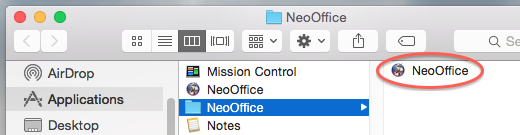
Som standard vil installereren lage en mappe som heter NeoOffice i /Applications-mappa. For å starte NeoOffice dobbeltklikker du på programikonet i Finder.
Important: Etter installering av programmet bør du laste ned de siste feilrettingene gjennom å laste ned og installere den siste NeoOffice programfiksen ("patch") og installere den.
Installere andre språkBy default, the installer only installs English but language packs are available for 57 other languages. To add support for any of the other languages not included in the installer, install NeoOffice 2.2.4 and then download and install the language pack for your language.
A list of available language packs can be found here.
Avinstallere NeoOffice 2.2.4For å avinstallere drar du NeoOffice programmappen i Finder til søppelbøtta i Mac OS X.
Avinstallering av NeoOffice skal ikke påvirke andre OpenOffice.org-installeringer du måtte ha på maskinen. NeoOffice og OpenOffice.org har fullstendig adskilte konfigurasjons- og brukerfiler.