![]() |
|
||||
| Ana Sayfa | İndirmeler | Destek |
| Özellikler | Bağışlar | Sıkça Sorulan Sorular |
| NeoOffice 3.1.1 Early Access Program | NeoOffice Mobile |
NeoOffice is a full-featured set of office applications (including word processing, spreadsheet, and presentation programs) for Mac OS X. Oracle'ın OpenOffice.org 3.0.1 ofis paketindeki özellikleri kullanarak, Mac kullanıcılarının her türlü ihtiyacını karşılayacak, ve buna uyum sağlayacak bir ofis paketi yaratmış bulunmaktayız. Eklediğimiz iyileştirmelerden bazıları yazacak olursak:
NeoOffice 3.0.2 includes nearly all of the features in OpenOffice.org 3.0.1. The only OpenOffice.org feature that is missing from NeoOffice 3.0.2 is Mac OS X Universal Access support. Unfortunately, we have not been able integrate OpenOffice.org's Universal Access code into NeoOffice so if you need Universal Access support, we recommend that you use OpenOffice.org, Microsoft Office, or Apple iWork.
This release adds several new features including:
Native Mac OS X text highlighting
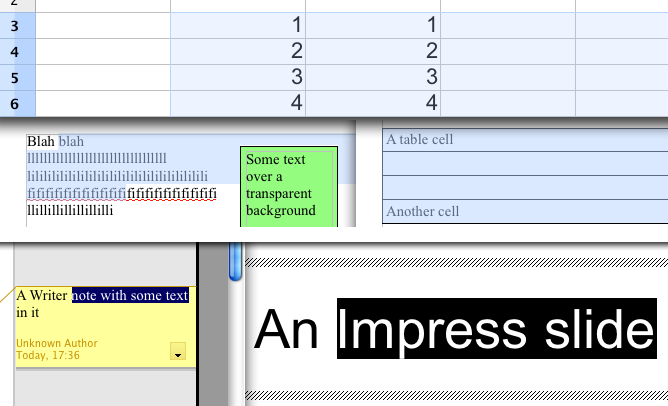
NeoOffice draws highlighted text the same as Apple's Safari and TextEdit applications. Recent versions of OpenOffice.org attempt to emulate native Mac OS X text highlighting by drawing a very light shade of the system highlight color on top of the highlighted text. However, many of our users have requested that we support full native Mac OS X text highlighting behavior in NeoOffice so we have rewritten the text highlighting code in NeoOffice's underlying OpenOffice.org code to draw highlighted text the same as Apple's various Mac OS X applications. The following screen snapshots show how NeoOffice's text highlighting behavior compares to OpenOffice.org's behavior:
Text highlighting in NeoOffice 3.0.2![]() |
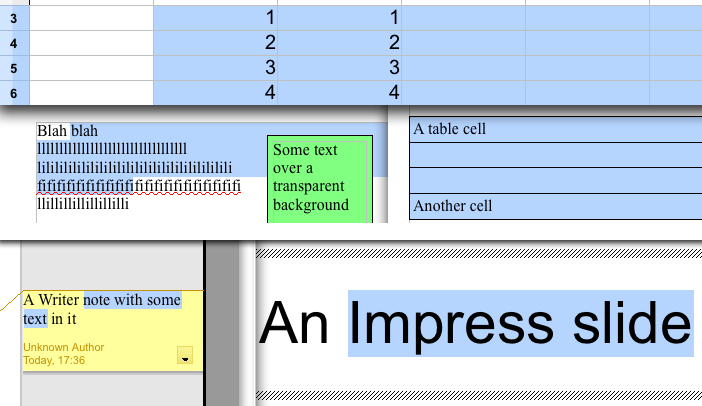
Text highlighting in OpenOffice.org 3.1.1![]() |
Open Calc or Impress instead of Writer at launch
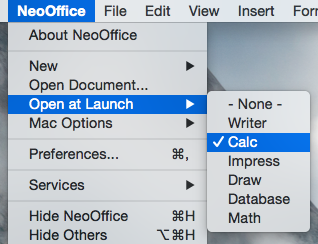
The NeoOffice :: Open at Launch menu allows you to choose which type of document to open when NeoOffice is launched. By default, NeoOffice opens a Writer document when launched. However, many of our users have requested that we provide an easy way to make a different document type such as Calc or Impress open when NeoOffice is launched so we have added the NeoOffice :: Open at Launch menu.
When a user selects one of the document types listed in this menu, NeoOffice will open the selected document type the next time that you launch it. Also, users can select the "- None -" menu item to only show the Mac OS X menubar when NeoOffice is launched. The screen snapshot to the right shows the NeoOffice :: Open at Launch menu with Calc set as the document type to open at launch.
NeoOffice draws text using each font's recommended glyph kerning. In previous versions, NeoOffice's underlying OpenOffice.org code moved glyphs to the nearest screen pixel. Since Mac OS X does not require glyphs to be aligned with the nearest screen pixel, NeoOffice ignores the glyph movements requested by the OpenOffice code so that text is drawn as close as possible to the font's recommended glyph kerning. The following screen snapshots show how NeoOffice's smoother text kerning behavior compares to the behavior in previous versions:
Text kerning in NeoOffice 3.0.2![]() |
Text kerning in previous versions of NeoOffice![]() |
Important note for Calc users who are using "Excel A1" or "Excel R1C1" as the formula syntax: In order to fix a crashing bug, we had to remove the ability to use "Excel A1" or "Excel R1C1" as the formula syntax. This feature was an experimental feature developed by Novell's Go-oo engineers that we included in NeoOffice 3.0.1 and 3.0.2 Early Access. Unfortunately, we found that Novell's experimental feature made NeoOffice Calc unstable and since Novell's engineers have removed this feature from their Go-oo releases, we were unable to fix the stability bugs in their code. As a result, we had to remove this feature.
Aşağıdaki listede NeoOffice 3.0.2'da bulunan, fakat OpenOffice.org 3.0.1'da bulunmayan, kullanıcılarımız tarafından talep edilmiş özellikler listelenmiştir:
![]() |
![]() |
![]() |
NeoOffice Mobile provides a way to securely share NeoOffice files with other users and other computers. It works by allowing you to "publish" a document from within NeoOffice to the NeoOffice Mobile server using a secure, encrypted connection. Once documents are published, they can be viewed using secure connections from regular web browsers or web-enabled mobile devices. Also, for NeoOffice users with NeoOffice Mobile installed, previously published documents can be opened directly in NeoOffice.
Anyone can create a free NeoOffice Mobile account. Free accounts can upload and view documents but they are limited to only 10 megabytes of storage and their documents expire after 48 hours. This allows users to try out NeoOffice Mobile and use it for temporary storage. NeoOffice donors, in contrast, have access to the complete set of features. For more information on the features that each type of account has access to, please visit the NeoOffice Mobile pricing page.
Native file locking support for local and networked volumes
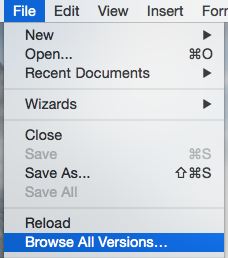
In OpenOffice.org 3.0, Oracle's engineers stopped using native file locking and starting using custom, non-native file locking code. Since most office suite applications use native file locking, their custom, non-native code caused frequent problems when users on different machines were editing the same file on a networked volume. We have restored native file locking in NeoOffice and now file locking should work the same as it did in NeoOffice 2.2.6.
Mac OS X Servisleri Desteği
NeoOffice'de, NeoOffice :: Services menüsü belgenizdeki herhangi bir veriyi seçtiğinizde aktif hale gelecektir. NeoOffice :: Services menüsündeki alt menülerden herhangi birini seçtiğiniz anda, seçilmiş veri, Servisler menüsünde seçtiğiniz eşleşen uygulamaya gönderilecektir. Lütfen not ediniz, NeoOffice şu anda seçtiğiniz veriyi değiştiren Mac OS X servislerini desteklememektedir. Sadece verinizi okuyabilen servisler desteklenmektedir. Örnek olarak, NeoOffice :: Services :: ChineseTextConverter menüsü NeoOffice'de kullanılabilir durumda olmayacaktır.
Ortam Tarayıcısı Desteği
Çok fazla Mac OS X kullanıcısı, Apple'nin iLife Ortam Tarayıcısı'nı çok kullanışlı bulmakta, ve bu tarayıcıyın NeoOffice'ye eklenmesi konusunda çok fazla talep aldık. Şans eseri, Karelia Yazılım'da çalışan cömert insanlar, bu Ortam Tarayıcısı'nı geliştirdiler ve, biz de bu tarayıcıyı NeoOffice'ye ekledik. Ortam Tarayıcısı'nı(Media Browser) Ortam Tarayıcısı'nı göster(Show Media Browser) araç çubuğu düğmesinden veya Araçlar :: Eklentiler :: Ortam Tarayıcısı'nı göster(Tools :: Add-Ons :: Show Media Browser) düğmesinden çalıştırdıktan sonra, fotoğraf, resim, video, veya bağlantılarınızı direk NeoOffice belgenize sürükleyebileceğiniz bir yüzen pencere açılacaktır.
Doğal yüzen araç pencereleri
OpenOffice.org'da, yüzen araç pencereleri genelde normal belge pencereleri gibi davranmaktadır(Örn. Styles and Formatting). Bunun yanında diğer yüzen araç pencereleri (Örn. Bullets and Numbering), Windows pencereleri gibi davranmaktadır. NeoOffice'de ise, tüm araç pencereleri, doğal yüzen Mac OS X pencereleri gibi davranacaktır. Bu pencerelerin başlık çubuğu ufak olacak, ve devamlı diğer belge pencerelerinin üstünde kalacaktır. Aynı zamanda, NeoOffice aktif uygulama olmadığı zaman, bu pencereler gizlenecek, ve NeoOffice tekrar aktif uygulama durumuna geçtiği anda, tekrar görünür hale geleceklerdir.
Yakınlaştırma ve Sürükleme izalanı hareketleri
Apple'nin piyasaya yeni sürdüğü Mac dizüstü bilgisayarları ile başlayan bu özellikte, izalanı, ilk olarak iPhone'da gördüğümüz, yakınlaştırma ve sürükleme hareketlerini desteklemektedir. Bu özelliğe sahip Mac dizüstü kullanıcıları, belgelerinde yakınlaştırma hareketlerini kullanarak, yakınlaştırma yapabilecek, ve sürükleme özelliğini kullanarak belgelerine yukarı veya aşağı hareket edebilecekler.
Hiç bir belge açık olmadığında menülerin erişilebilir olması
OpenOffice.org'da, hiç bir belge açık olmadığında, çok az erişilebilir menü elemanı bulunmaktadır. Fakat NeoOffice'de ise, hiç bir döküman açık olmasa bile menüler erişilebilir durumdadır. Bu özellik sayesinde kullanıcılarımız, hiç bir belge açmaya gerek kalmadan, Son açılan belgeler ya da NeoOffice Yardım gibi sık kullanılan menülere erişebilmektedirler.
Tarayıcı ve kameralardan resim alma
Tools :: Add-ons :: Paste Image from Camera or Scanner bölümü eklenmiştir. Bu menü elemanı sayesinde NeoOffice'ye direk olarak tarayıcı veya kameralardan, resim eklemek mümkündür. Bu özellik, Apple'nin Image Capture uygulamasının desteklediği kamera ve tarayıcılarda kullanılabilmektedir. Eğer Image Capture uygulamasının desteklediği bir kamera ya da başka bir çevre biriminiz var ise, bu özelliği kullanarak, açık olan belgenize resim eklemeniz mümkündür. Buna ek olarak, eklediğiniz resim aynı zamanda sistem panosuna da ekleneceğinden, bu resim ya da fotoğrafı başka uygulamalarda da kullanmanız mümkündür.
Pencere başlık çubuğunda Command-tıklama desteği
Çoğu Mac OS X uygulamasında, daha önce kaydedilmiş bir belge açıldığı zaman, pencere başlık çubuğunda uygulamanın simgesi belirecektir. Bu simgeye Command-tıklama, bu belgenin kayıtlı olduğu dosya ve klasörleri listeleyen bir menünün açılmasını sağlar. Bu menüden seçeceğiniz her hangi bir eleman ise Finder'da açılacaktır.
Mac OS X Leopard dilbilgisi kontrol sistemi (Sadece Mac OS X 10.5.x ve daha yüksek)
Mac OS X 10.5.x'te, Apple bazı diller için dilbilgisi kontrol sistemi ekledi. Neooffice bu Mac OS X özelliğinin avantajını kullanarak, Tools :: Add-Ons menüsüne bazı menü seçenekleri eklemiş bulunmaktayız. Bu menü seçenekleri, Mac OS X Leopard'ın dilbilgisi kontrol sistemini kullanarak, belgenizdeki seçilmiş verinin ya da tüm dökümanın dilbilgisi yanlışlarını ve olası düzeltmeleri size gösterecektir. Lütfen, Mac OS X'in sadece İngilizce için bu özelliği desteklediğini not ediniz.