
Download NeoOffice
The NeoOffice project is no longer active
As a replacement, you may want to try LibreOffice
| NeoOffice version | Price | macOS and OS X versions | Notes |
|---|---|---|---|
| Current versions | |||
| Download from either of the following sites: | Free |
|
Mac App Store users: some features are not available in the Mac App Store version in order to comply with Apple's Mac App Store security requirements |
| Older versions | |||
| NeoOffice 2017.33 Professional Edition | Free |
|
|
| NeoOffice 2015.12 Classic Edition | Free |
|
|
| NeoOffice 3.4.1 + Patch 28 | Free |
|
|
Problems after upgrading to NeoOffice 2022? Try these steps
Install NeoOffice
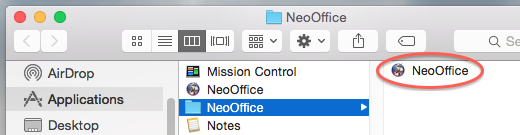 To install NeoOffice, double-click on the downloaded file in your Downloads folder. This should open a window in the Finder that contains the NeoOffice installer. Double-click on the software installer to start the installation.
The installer installs NeoOffice in one of the following folders:
- In the Applications folder
- In the Applications / NeoOffice folder as shown in the screen snapshot
Uninstall NeoOffice
To uninstall, just drag the NeoOffice application from the Finder into the Trash and empty the Trash.