NeoOffice è un insieme completo di applicazioni per l'ufficio per Mac OS X. Created in 2003 when there was no Mac OS X version of OpenOffice.org available, Patrick Luby and Ed Peterlin have devoted their decades of Mac software engineering experience to create an office suite that is adapted to the unique needs of Mac users.
While OpenOffice.org and LibreOffice now have their own Mac OS X versions, Patrick and Ed continually add improvements to NeoOffice that our Mac OS X users will not find in OpenOffice.org or LibreOffice such as:
- Codice Mac OS X estremamente stabile che viene usato giornalmente da centinaia di migliaia di utilizzatori di NeoOffice dal 2003
- Significant speed improvements to the OpenOffice.org text layout, rendering, and printing code
- Native Mac OS X text highlighting
- Native file locking support for local and networked volumes
- Mac OS X Services support
- Native floating tool windows
New in NeoOffice 3.2.1
This release adds several new features for Mac OS X 10.7 Lion users including:
-

In Mac OS X 10.7 Lion, Apple has added a new feature called Versions that allows applications to save and restore previous versions of your document. Using this new feature, saving a document causes Mac OS X to keep a copy of your document before any changes are saved so that you can restore any of the previous versions of your document.
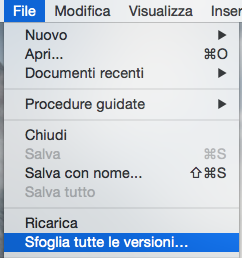
The NeoOffice engineers have implemented this new Mac OS X feature and saving a file will automatically keep a copy of your document before any changes are saved. Also, by selecting NeoOffice's new Browse All Versions menu, you will be able to restore any of the previous versions of your document in Apple's document version browser. -

In Mac OS X 10.7 Lion, Apple has added a new feature called Full-Screen mode that allows users to expand a window to fill the entire screen by clicking a new button in the window title bar.The NeoOffice engineers have implemented this new Mac OS X feature and pressing the new button or selecting NeoOffice's existing View :: Full Screen menu will cause a document to enter Full-Screen mode.
-
In Mac OS X 10.7 Lion, Apple has added a new feature called Resume that allows applications to automatically reopen the documents that were open the last time that the application quit. This new feature helps Mac OS X users avoid the tedious process of reopening their documents after launching an application.
The NeoOffice engineers have implemented this new Mac OS X feature and NeoOffice will automatically reopen any documents that you had open the last time that NeoOffice quit immediately after NeoOffice has been launched. Also, NeoOffice users who do not like this new Mac OS X feature, will be able to disable this feature by selecting NeoOffice's new NeoOffice :: Mac OS X Options :: Disable Mac OS X Resume menu.
Mac OS X features
Below is a list of some of the Mac OS X features requested by our users that are in NeoOffice 3.2.1 but are not in OpenOffice.org or LibreOffice:
Native Mac OS X text highlighting
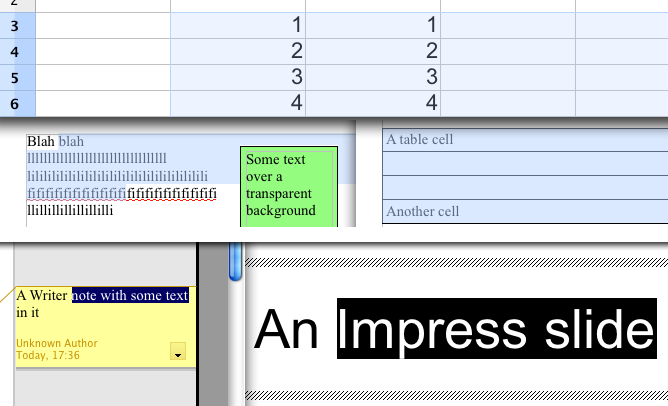
NeoOffice draws highlighted text the same as Apple's Safari and TextEdit applications. Recent versions of OpenOffice.org and LibreOffice attempt to emulate native Mac OS X text highlighting by drawing a very light shade of the system highlight color on top of the highlighted text. However, many of our users have requested that we support full native Mac OS X text highlighting behavior in NeoOffice so we have rewritten the text highlighting code in NeoOffice's underlying OpenOffice.org code to draw highlighted text the same as Apple's various Mac OS X applications. The following screen snapshots show how NeoOffice's text highlighting behavior compares to OpenOffice.org's and LibreOffice's behavior:
Text highlighting in NeoOffice 
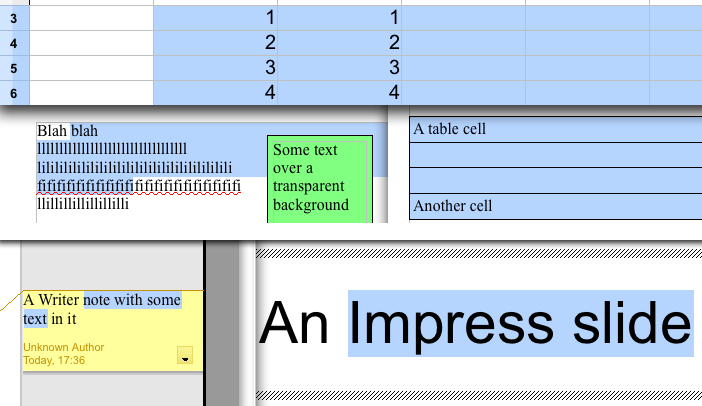
Text highlighting in OpenOffice.org e LibreOffice 
Open Calc or Impress instead of Writer at launch
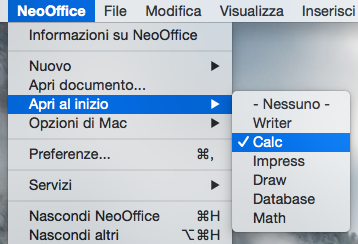
The NeoOffice :: Open at Launch menu allows you to choose which type of document to open when NeoOffice is launched. By default, NeoOffice opens a Writer document when launched. However, many of our users have requested that we provide an easy way to make a different document type such as Calc or Impress open when NeoOffice is launched so we have added the NeoOffice :: Open at Launch menu.When a user selects one of the document types listed in this menu, NeoOffice will open the selected document type the next time that you launch it. Also, users can select the "- None -" menu item to only show the Mac OS X menubar when NeoOffice is launched. The screen snapshot to the right shows the NeoOffice :: Open at Launch menu with Calc set as the document type to open at launch.
-


NeoOffice Mobile provides a way to securely share NeoOffice files with other users and other computers. It works by allowing you to "publish" a document from within NeoOffice to the NeoOffice Mobile server using a secure, encrypted connection. Once documents are published, they can be viewed using secure connections from regular web browsers or web-enabled mobile devices. Also, NeoOffice users can open previously published documents directly in NeoOffice.
Anyone can create a free NeoOffice Mobile account. Free accounts can upload and view documents but they are limited to only 10 megabytes of storage and their documents expire after 7 days. This allows users to try out NeoOffice Mobile and use it for temporary storage. NeoOffice donors, in contrast, have access to the complete set of features. For more information on the features that each type of account has access to, please visit the NeoOffice Mobile pricing page.
-
NeoOffice now uses Apple's CoreText text layout and rendering functions. In contrast, OpenOffice.org and LibreOffice use Apple's obsolete ATSUI functions. The CoreText functions are up to twice as fast as the ATSUI functions and the CoreText functions provide improved text layout and rendering for many Windows OpenType fonts.
Native file locking support for local and networked volumes
OpenOffice.org and LibreOffice stopped using native file locking and started using custom, non-native file locking code. Since most office suite applications use native file locking, their custom, non-native code caused frequent problems when users on different machines were editing the same file on a networked volume. We have restored native file locking in NeoOffice and now file locking should work the same as it did in NeoOffice 2.2.6.
Supporto per i Servizi del Mac OS X
In NeoOffice, molti dei menù all'interno del menù NeoOffice :: Servizi risulteranno abilitati appena evidenzierai dei dati nel tuo documento. Quando selezionerai uno qualsiasi dei sub-menù nel menù NeoOffice :: Servizi, i dati evidenziati verranno inviati all'applicazione del Mac OS X che meglio si sposa con il Servizio che hai selezionato. NeoOffice supporta anche i servizi del Mac OS X che cambia i dati evidenziati nel documento.
Supporto per il Media Browser
Molti utenti del Mac OS X trovano il Media Browser di iLife della Apple molto utile ed abbiamo ricevuto molte richieste per includere questa caratteristica in NeoOffice. Fortunatamente, le generose persone di Karelia Software hanno sviluppato il iMedia Browser e noi lo abbiamo intergato in NeoOffice. Una volta aperto il Media Browser cliccando sul menù Strumenti :: Add-ons :: Show Media Browser, apparirà una finestra riposizionabile dalla quale potrai trascinare immagini, file sonori o link direttamente nei documenti di NeoOffice.
Finestre degli strumenti native
In OpenOffice.org e LibreOffice, molte delle finestre degli strumenti sono "galleggianti" come quella degli Stili e Formattazione e dei Colori appaiono e si comportano come le finestre dei documenti. Ma in NeoOffice tutte le finestre degli strumenti si comportano come finestre degli strumenti native. Questo significa che hanno l'aspetto e si comportano come nelle altre applicazioni del Mac OS X. Esse avranno delle piccole barre del titolo, e tutte le finestre "galleggeranno" sopra quelle dei documenti, e quando NeoOffice non è l'applicazione attiva, tutte le finestre degli strumenti verranno nascoste fino a che NeoOffice non tornerò ad essere di nuovo l'applicazione attiva.
Disponibilità dei menù quando non c'è alcun documento aperto
OpenOffice.org e LibreOffice hanno disponibili solo un menù molto scarno quando non erano presenti documenti aperti. In NeoOffice, i menù sono disponibili anche quando non ci sono documenti aperti. Questa caratteristica permetterà agli utilizzatori di accedere ad alcuni dei menù più utilizzati come i Documenti Recenti o la Guida di NeoOffice che prima erano accessibili solo dopo aver aperto almeno un documento.
Importazione di immagini da scanner e macchine fotografiche digitali
È stato aggiunta una voce di menù - Strumenti :: Add-ons :: Paste Image from Camera or Scanner. La selezione di questa voce ti permette di importare direttamente immagini in NeoOffice da qualsiasi dispositivo supportato dall'applicazione Apple Acquisizione Immagine (come macchine fotografiche digitali e scanner). Se hai una qualsiasi di queste periferiche collegate alla tua macchina e Acquisizione Immagini le riconosce, la selezione di questa voce mostrerà la finestra di dialogo di Mac OS X Acquisizione Immagine. Usando questa finestra puoi importare un'immagine da ogni periferica riconosciuta dentro il tuo documento. Inoltre, l'immagine importata sarà copiata negli appunti così che tu possa incollare copie supplementari dell'immagine in NeoOffice o in ogni altra applicazione.
Command(mela)-click nella barra del titolo
In molte applicazioni del Mac OS X, quando si apre un documento precedentemente salvato, nella barra del titolo appare una piccola icona. Se si fa click premendo contemporaneamente il tasto Command (la mela, per intenderci), appare un menù che elenca il nome del file e le cartelle (il percorso) nel quale quel documento si trova. Cliccando su uno qualsiasi di queste voci apre il Finder in quella posizione.
Supporto per il controllore grammaticale di Mac OS X
Nel Mac OS X 10.5.x, Apple ha aggiunto un controllore grammaticale per alcune lingue. NeoOffice si avvantaggia di questa caratteristica del Mac OS X, quindi abbiamo aggiunto alcune voci in Strumenti :: Add-ons. Queste voci permettono di usare il controllo grammaticale di Mac OS X Leopard e le correzioni consigliate per le parti selezionate del testo del documento o per l'intero documento. Fai attenzione che al momento il correttore grammaticale del Mac OS X permette l'uso solo della lingua inglese.